
Local install
The software installs on your workstation or your network. Inspection reports stay in your environments.
Inspection tracking · Industry
Excel started your tracking. It did the job well. The spreadsheet turns into a drag once reports pile up and due dates slip. Values no longer trace back to their source. Here is an honest look at your options.
The shift
Reports scattered across spreadsheets and PDFs become per-equipment tracking, traceable over time.
1 · SCATTERED
Linked to the asset
3 · STEERED · ASSET CONDITION
| EQUIPMENT | STATUS |
|---|---|
| Process tank | Up to date |
| Heat exchanger | To schedule |
| Piping | Check due |
Traceable to the source report
Excel is often the first inspection-tracking tool, and that is a sound starting point: free, flexible, familiar to everyone.
The spreadsheet reaches its limits when inspection reports pile up as PDFs. Regulatory due dates rest on one person's vigilance. Measurements lose the link to their source report.
Integrity Loop reads your PDF reports, links each one to the right equipment and computes per-asset health. The software stays local, off-cloud. And you keep exporting to Excel whenever you need to.
 Inspection tracking
The starting point
Inspection tracking almost always begins in a spreadsheet, and for good reasons. Excel is already installed, costs nothing extra, and everyone knows how to use it.
You create a tab per site, a row per piece of equipment, a column per due date. In a few hours, an inspection lead has readable tracking without depending on an IT department.
That flexibility is a real strength. A spreadsheet bends to any way of working, shares by email and filters in two clicks. For a handful of assets on a single site, Excel is often the most honest answer.
So the point isn't to leave Excel on principle. It's knowing at what volume and under what obligations the spreadsheet stops being enough. And what takes over, without throwing away what already worked.
The question isn't leaving Excel, but knowing when it stops being enough.
Integrity Loop exports to Excel, PDF and CSV. You keep the spreadsheet where it shines: sharing, presenting, reworking an extract. What changes is the source of truth that feeds it.
Where the spreadsheet strains
These difficulties are not flaws in the spreadsheet. They appear once the volume of reports and the number of sites grow. Tracking obligations then exceed what a spreadsheet was built for.
The inspection PDF stays in a folder. The spreadsheet holds only a summary retyped by hand, sometimes wrong.
A missed periodic inspection triggers no alert. The spreadsheet doesn't warn you; it waits to be re-read.
Comparing measured thickness year over year means manual work. Ranking equipment by criticality does too.
The risk isn't a broken formula. It's the gap between the original inspection report and the spreadsheet row meant to summarise it. At asset-base scale, that gap becomes invisible.
The tools you already have
Many teams combine these three tools. Each solves a real problem. They were not built to read an inspection report and derive per-equipment health from it.
Excel, the DMS and the CMMS all assume someone has already read the inspection report and keyed in the essentials. That is precisely the step Integrity Loop takes on, without replacing any of these tools.
How it works
The principle is simple: start from your current reports. With no OCR and no retyping, they become per-equipment tracking. An adapter is calibrated for each format. An unsupported format is archived and flagged rather than guessed.
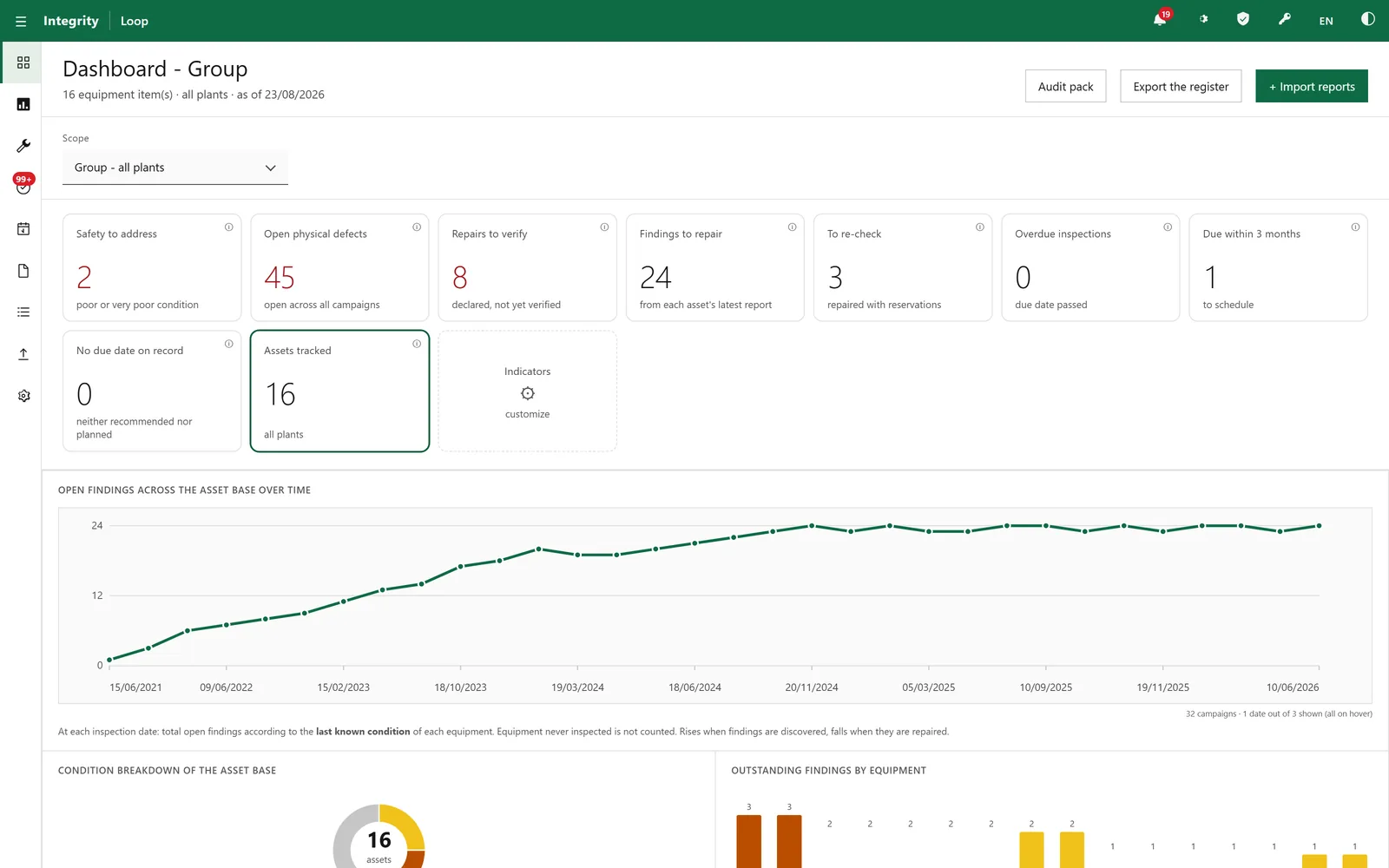
You drop in a PDF or a full folder. With no change to your current tools or upfront migration.
An adapter calibrated for your format extracts measurements, findings, deadlines, identifiers, dates, locations and severity. Without OCR.
Each value joins the right equipment or zone, on a verified identity. An unrecognised report is archived and flagged.
Per-equipment history builds up to ten years. Defects and repaired zones are tracked on a 2D map.
Health KPIs, regulatory due dates, criticality-based prioritisation, and an audit dossier exportable in minutes.
The scope
What you bring, what you gain
In: your current reports. Out: a per-equipment register the field and management use immediately. With no promise beyond what the software actually does.
In practice
IllustrationPicture an inspection team whose tracking lives in a well-built Excel workbook, one tab per site. The detailed inspection reports sleep as PDFs in a shared folder.
Each lead knows their own assets. Comparing an equipment's measured thickness year over year means reopening every report by hand.
By dropping the existing reports into the software, the team gets a per-equipment register. It shows which measurements are falling campaign after campaign, which due dates are approaching, which defects recur from one site to the next.
Every value stays linked to its source PDF. The spreadsheet doesn't disappear; it becomes an export surface again, no longer the asset base's only memory.
An illustration of how it works on a generic case. This is not a quantified customer result.
Factual comparison
An honest table: each tool keeps its strengths. The goal isn't to crown a winner, but to see which tool answers which need in inspection tracking.
| Criterion | Excel (spreadsheet) | DMS (SharePoint) | CMMS / EAM | Field inspection app | IDMS / AIM | Integrity Loop |
|---|---|---|---|---|---|---|
| Entry cost and setup | Very low, immediate | Moderate | High | Moderate | High | Dedicated install |
| Formatting flexibility | Excellent | Low | Vendor-defined | Form-based | Standards-driven | Framed by integrity tracking |
| Report storage and versioning | Limited | Strong point | Variable | Within the app | Strong | Per-equipment history (10 years) |
| Reads existing PDF content | Manual entry | Stores only | Rarely | Captures at source, not existing PDFs | Structured entry | Adapter extraction, no OCR |
| Links values to the equipment | Manual | No | Via data entry | At capture | Yes | Validated identity |
| Per-asset health and prioritisation | Formulas to maintain | No | Partial | No health trend | RBI-oriented | Recomputed at each import |
| Value to source-PDF traceability | No | Separate file | Variable | Within the app | Yes | Every value linked |
| Due dates and overdue tracking | Manual | No | Work orders | Reminders | Yes | Computed automatically |
| Audit dossier | Rebuilt by hand | File search | Extract | Partial | Yes | Ready in minutes |
| Local and offline operation | Yes | Often cloud | Variable | Often cloud | Variable | Local, off-cloud and offline |
| Export to Excel | Native | No | Vendor-dependent | CSV / PDF | Yes | Excel, PDF, CSV |
The tools often coexist. Integrity Loop replaces neither the DMS that stores, the CMMS that plans, nor the field app that captures new checks. It fills the empty cell: reading existing inspection reports and deriving per-asset health. Its results then flow back to Excel.
Limits
Deployment
The software installs on your workstation or your network. Inspection reports stay in your environments.
Without dependence on a connection or a third-party service. Processing happens on site, with no external transfer.
Every value stays linked to the original PDF report, viewable and verifiable at any time.
The software structures and prioritises; interpreting a defect and making the call stay yours.
Frequently asked questions
No. Excel stays useful for sharing, presenting and reworking data. Integrity Loop exports straight to Excel, PDF and CSV. What changes is the source of truth. Instead of manual retyping, the software reads your PDFs and turns them into per-equipment tracking. The spreadsheet becomes an export format, no longer the only memory of your asset base.
No, the software uses no OCR. It reads PDF reports through an adapter calibrated for each inspection format. A format no adapter covers is archived and flagged rather than guessed. Format coverage grows one format at a time, transparently. Identity is validated before any value is attached.
A CMMS or EAM drives work orders, planned maintenance and spare parts, and expects manual entry. Integrity Loop starts from inspection reports, extracts the measurements and links them to the equipment. Integrity is then tracked over time. The two are complementary: the software issues no work orders and does not replace your maintenance system.
Every measurement and finding the software extracts stays linked to the source PDF it came from. From a KPI or a history line, you open the original document and check the value in context. That traceability is what a spreadsheet lacks. A hand-typed summary quickly drifts from the report it is meant to reflect.
No. Integrity Loop runs locally, off-cloud and offline. The software installs on your workstation or your network. Inspection reports are processed on site, with no transfer to an external service. This is a sovereignty choice: your integrity data stays with you.
Yes. Once reports are imported and linked, the audit dossier exports in Excel, PDF or CSV. Rebuilding that dossier from a spreadsheet and a folder of PDFs takes hours of searching. The software gathers the history, the due dates and the findings already structured asset by asset.
Go further
In conclusion
Inspection tracking deserves better than a binary choice between the spreadsheet and a heavy system. Excel launched your tracking and stays valuable for sharing and presenting. It shows its limits as soon as you have to read hundreds of reports and hold due dates.
Integrity Loop fills that place. It reads your PDF reports without OCR, links them to the asset and computes asset-base health. The software stays local, off-cloud. Every value traces back to its source, and your Excel exports keep existing. You gain a source of truth the spreadsheet couldn't offer.
The return on investment
Time spent recopying reports, due dates held, audit dossiers rebuilt. Estimate, from your own figures, what moving from Excel to per-asset tracking could represent.
Calculate the ROIIntegrity Loop reads your PDFs, links them to each piece of equipment and computes your asset base's health. The software stays local, off-cloud. Excel stays by your side for export.
 AI for industry
